Inspiration: Born from a weekend road trip from San Jose to Portland — I wanted a way to revisit every stop along the way and share the story with friends. Paseo reads your photo library, groups shots by day and time slot, reverse-geocodes each location through multiple providers (Apple Maps, Mapbox, OpenStreetMap), and renders a shareable timeline card.
Core Features:
- Automatic timeline from trip photos grouped by day, time, and venue
- Multi-layer reverse geocoding for accurate place names
- Interactive map-based location editing
- AI enrichment via on-device Apple Intelligence or Claude API
- Easily export as a shareable image card
What I Learned Building It:
-
Do I actually need AI-powered features? The original design had AI doing the heavy lifting: ingest all the photos, analyze their content, and generate a rich memory card from scratch. In practice, this was over-engineering. The core product goal was always to let users produce a clean, shareable timeline, something you could send to family or post as a travel guide. Leaning entirely on AI turned the output into a journal entry, which muddied that intent. The pivotal decision was shifting from a pure AI generation architecture to a traditional engineering pipeline: parse metadata, structure the timeline, render and export. This made the full user journey faster, more predictable, and easier to reason about.
-
How to get accurate location from a photo? The naive approach was to read GPS coordinates straight from photo metadata. It worked poorly in practice since GPS accuracy varies too much to reliably identify a specific venue. The fix was twofold: fan out across multiple reverse-geocoding providers to increase the hit rate, and give users a lightweight popup map to manually correct any location after the auto-detection pass. A small lift that closed the most fundamental gap.
-
How to generate the final shareable image? The first attempt used Apple’s native screenshot renderer, which handled long-form layouts poorly. After burning significant time debugging, I reframed the problem: since the app already holds all structured text and metadata, I could render the result card directly from data instead of screenshotting a view. Switching to a programmatic layout approach solved it cleanly.
App Views:
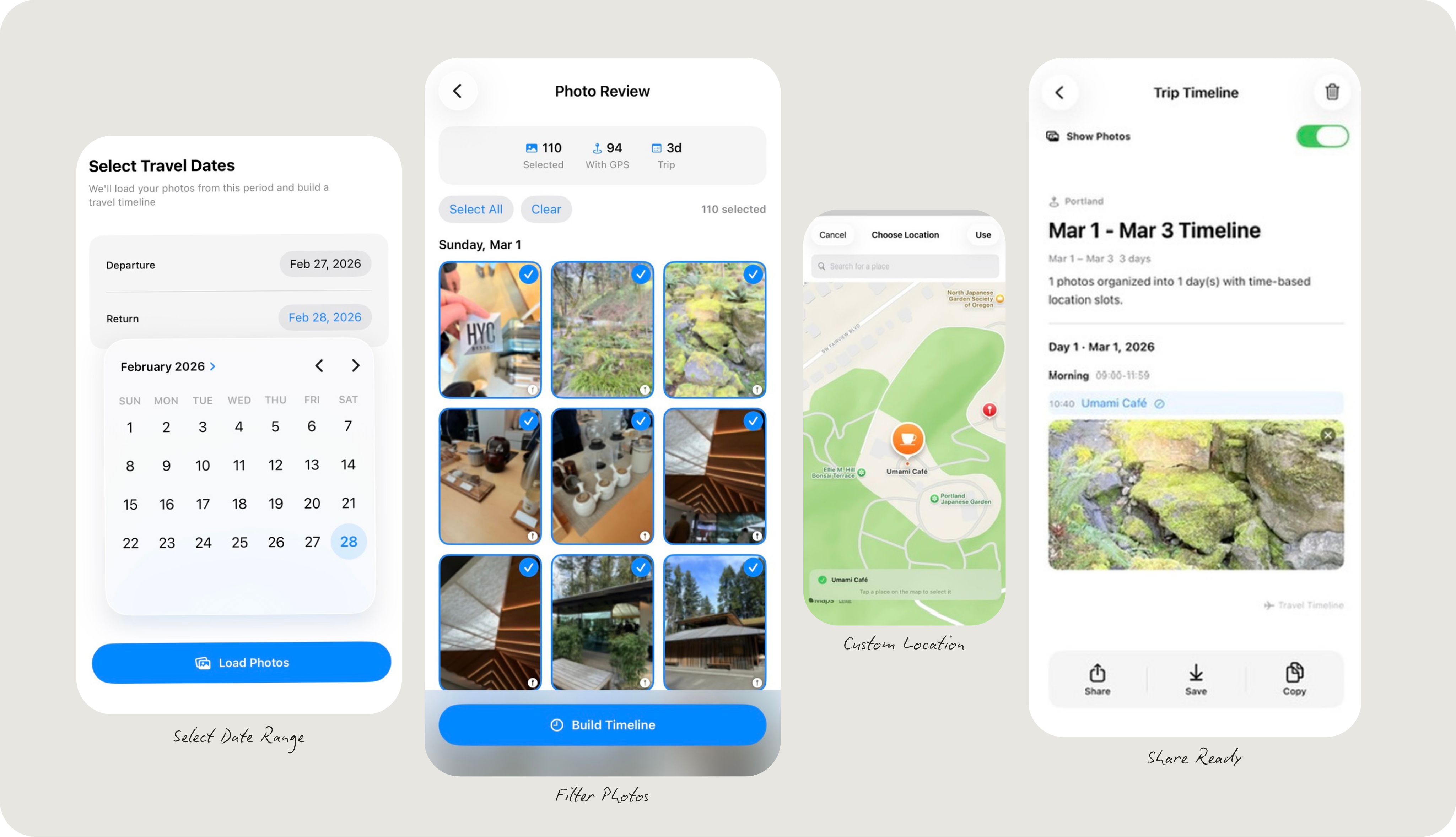
Demo Output: My Portland weekend getaway timeline generated by Paseo.
